


Geta Alarm Music Player
4.6976.00 Reviews
App Specs
- Version
- 1.1.4
- Updated On
- License
- Free
- Downloads
- 500,000+
- Developer
- raastcoin.dev
- Categories
- Music & Audio
- Platform
- Android
Screenshots
 Analysis by AppCompare
I judge an alarm app by a simple test: can I set it up without fuss, and can I trust it to fit the way my mornings actually work? Geta Alarm Music Player is a music-and-audio app from raastcoin.dev that puts personal sound at the center of waking up. It is free to use, and its appeal is easy to understand: if a familiar song feels kinder than a standard alarm tone, this is a straightforward idea to try.
What free access means here
The app is free, which makes it a low-commitment option for anyone curious about music alarms. That is the clearest value point: you can explore its alarm-focused approach without weighing a purchase price against features. I would not treat “free” as a promise about every possible cost or condition beyond that; the practical question is whether its day-to-day use suits you.
It has a 4.6 average from around 4,400 ratings, with roughly 976 written reviews and over 500,000 installs. Those figures suggest that plenty of people have tried it, but they are not a substitute for checking whether its music handling and routine fit your own phone and habits. It is rated for Teen users, and the current version is 1.1.4.
Where the value comes from
For me, the main value is having a wake-up sound that feels chosen rather than imposed. A song you already associate with a good mood can make the first moments of the day less abrupt. That is a modest benefit, not magic: the app cannot make an early start enjoyable by itself, but it can make the alarm feel more personal.
The useful way to think about this app is as a focused alternative to a phone’s basic clock alarm. If you are satisfied with a built-in tone and only need a dependable reminder, the default clock is likely enough. If sound choice is the part you want to change, a dedicated music alarm may be worth trying, especially when you already keep suitable tracks on your device.
Using music alarms in a real routine
First things first, installing Geta Alarm Music Player was a breeze. Once I had it on my phone, it took just a few taps to get things rolling. The interface is clean and intuitive, which I really appreciate. Sometimes, apps like this can be overly complex, but not this one. It’s straightforward, so you can easily navigate without feeling like you're solving a puzzle.
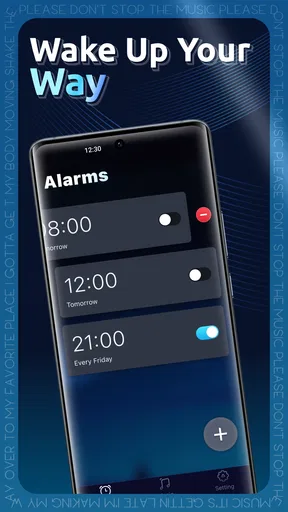
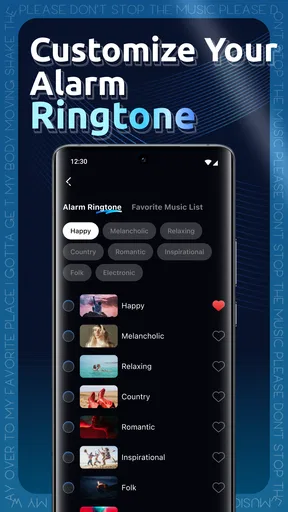
Setting an alarm is as simple as it gets. You just select the time, choose your music, and you’re all set. What I found particularly cool is the fade-in feature. Instead of being jolted awake by a blast of sound, the music gradually increases in volume, which is a much more pleasant way to start the day.
Worth Reading Before You Choose

EA SPORTS FC Mobile 26 Is a Bigger Football Game, but It Takes Time

Flipboard Shows What News Apps Must Do Beyond the Feed

Switching to Android Auto Means Rethinking Your Driving Routine

Google Calendar Makes a Crowded Week Easier to Manage

Ludo King Makes the Most of the Minutes Between Plans

Baby Panda World Brings Quick Play to Modern Phones, but Its Game Library Feels Busy
Music library integration
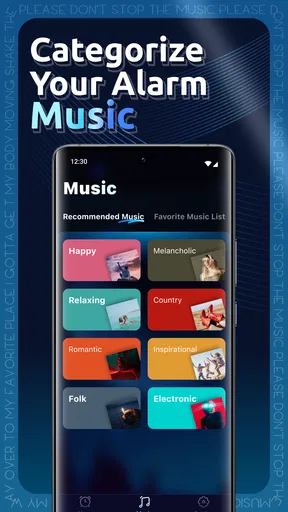
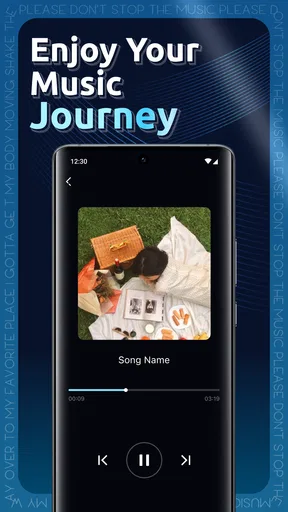
Now, let’s talk about music integration. The app syncs seamlessly with your existing music library. It’s pretty awesome because it doesn’t limit you to any specific platform, as long as you have the tracks on your device. Whether you're into rock, pop, or classical, you can set any song as your alarm tone. I tried it with a few different genres, and it worked perfectly each time.
Another neat feature is the ability to create playlists. So, if you’re someone who takes a little longer to wake up, you can have a series of songs play one after the other. It’s like having your own morning concert!
Choosing music that works as an alarm
There is a small but important difference between choosing a song you love and choosing one that works well at the moment you need to wake. A quiet intro or a long stretch before the vocals arrive may sound lovely at bedtime but can be easy to sleep through. I’d start with a track whose opening is clear without being harsh, then use the gradual volume increase to avoid an abrupt start.
Playlists can help if one song becomes easy to ignore, but I would keep the sequence deliberate rather than simply using a long mix. A few contrasting tracks can make the alarm less predictable; a playlist that is too soothing may instead encourage you to stay under the covers. For a workday, I’d choose something that gently gets more energetic, while saving slower music for mornings when I have more time.
Extra controls and bedtime use
Aside from the music player capabilities, the app offers a set of extra features that enhance its functionality. For instance, there’s a snooze option, which is pretty standard but always necessary. The snooze duration is customizable, so if you’re someone who loves a few extra minutes of sleep, they’ve got you covered.
There's also a sleep timer, which is perfect for those who like to fall asleep to music. You can set it to gradually lower the volume until it stops, ensuring you drift off without worrying about your playlist running all night.
These controls serve different jobs, so I would set them with intention. A short, consistent snooze can be useful when I need a moment to become fully alert; repeated snoozing can also turn a carefully selected song into background noise. At bedtime, the sleep timer is a separate convenience: it lets music accompany winding down without requiring me to remember to stop playback later.
Making the schedule fit your week
From a design perspective, the app is sleek and modern. It offers a few themes, allowing you to customize the look to suit your taste. While the options aren’t endless, they’re enough to keep things visually appealing.
Customization options extend to alarm settings as well. You can adjust the volume levels, choose whether the alarm repeats on certain days, and even set different alarms for different times of the week. It’s a level of personalization that makes the app versatile for various users.
That weekly flexibility is useful for a realistic routine: I might use one schedule for early workdays and a different one for a slower weekend morning, rather than editing the same alarm every night. Before relying on a new setup, I’d check the selected days and sound together. A good song paired with the wrong repeat pattern is still a bad alarm, and this quick habit helps avoid accidental early or missed wake-ups.
Reliability and sensible backup habits
Performance-wise, Geta Alarm Music Player is solid. During my testing, the alarms went off without a hitch, and the music played smoothly every time. The app runs quietly in the background and doesn’t drain the battery, which is a huge plus for any smartphone user.
However, like any app, it’s not entirely flawless. There were a couple of times where I noticed a slight delay in the music starting, but nothing that impacted the overall functionality. It’s worth mentioning, but definitely not a deal-breaker.
That occasional delay matters most when the alarm is tied to something inflexible, such as an early shift or a time-sensitive appointment. I would test a new alarm at a convenient time before making it my only wake-up plan, and keep the phone’s normal alarm available as a backup on especially important mornings. That is not a criticism unique to this app; it is a sensible precaution whenever a phone alarm depends on playback as well as timing.
How it compares with common alternatives
The usual alternative is the clock app already on a phone. It is the more sensible choice if you want the fewest moving parts, a familiar setup, or a simple tone that you know how to hear. A music alarm is more appealing when you want to choose the mood and use tracks already stored on your device; the trade-off is that your music choice becomes part of the reliability equation.
Compared with a streaming-based morning routine, a library-based approach can be convenient if the tracks you want are already available locally. It also means your selection is tied to what you have on the device, rather than offering the open-ended discovery people may expect from a streaming service. I would choose this app for a familiar personal soundtrack, not as a way to find new music or manage a broader listening library.
Who is likely to get the most from it?
I can see this working especially well for someone who has music on their phone and wants a more personal alarm without turning setup into a project. It also suits people with different weekday and weekend schedules, or anyone who prefers a gradual wake-up and likes to wind down with music at night. A student, a shift worker, or a parent preparing a consistent morning routine might value those practical choices, provided the selected schedule matches their real week.
I would skip it if I rarely listen to music stored on my device, if a basic alarm already does everything I need, or if I would rather avoid depending on a music track to wake me. It is also not the best fit for someone who wants a large range of visual themes or a full music-discovery tool. The core appeal is narrow by design: choosing personal audio for alarms and bedtime listening, not replacing every music or clock app.
My verdict on trying it
So, would I recommend Geta Alarm Music Player? Absolutely! It’s a fantastic tool for anyone looking to bring a bit more joy into their morning routine. The ability to wake up to your favorite tunes is a simple yet effective way to start the day on a positive note.
The app strikes a nice balance between being feature-rich and user-friendly, making it accessible to everyone. Whether you’re a music lover or just someone who wants a better way to wake up, this app is worth a try. So, why not give it a shot and start your mornings with a melody?
My recommendation comes with one practical condition: choose a track that actually wakes you, confirm the days and volume, and test the arrangement before depending on it for a critical morning. At no cost to try, that is a reasonable experiment for anyone who wants a more personal start to the day. If you value simplicity above sound choice, stick with your phone’s clock; if music is the part of waking up you want to change, this is a focused option to consider.
Pros
- Integrates seamlessly with Spotify playlists.
- Customizable alarm tones for personalization.
- Intuitive interface for easy navigation.
- Snooze options tailored to user preference.
- Minimal battery consumption during use.
Cons
- Limited offline functionality available.
- Ads can be intrusive at times.
- Requires premium for certain features.
- No support for other streaming services.
- Occasional lag on older devices.
FAQs for Geta Alarm Music Player
What features does Geta Alarm Music Player offer?
Geta Alarm Music Player combines an alarm clock with a music player, allowing users to wake up to their favorite tunes. It includes customizable alarm settings, playlists, and support for various music formats. The app also features a sleep timer and a user-friendly interface, making it ideal for music lovers who want a personalized wake-up experience.
Is Geta Alarm Music Player compatible with both Android and iOS devices?
Yes, Geta Alarm Music Player is available for both Android and iOS platforms. The app is designed to provide a seamless experience across different devices, ensuring that users can enjoy its features regardless of their operating system. Check the app store on your device for compatibility information specific to your model.
Does Geta Alarm Music Player require an internet connection to function?
No, Geta Alarm Music Player does not require an internet connection for basic functionalities like setting alarms and playing locally stored music. However, if you wish to stream music from online services, an internet connection will be necessary. The app is optimized to work efficiently both online and offline.
Can I integrate Geta Alarm Music Player with other music services?
Geta Alarm Music Player supports integration with popular music streaming services, allowing users to access their playlists and favorite tracks easily. However, the availability of this feature may vary depending on the service and region. It’s recommended to check the app’s settings for detailed integration options and compatibility.
Is there a free version of Geta Alarm Music Player available?
Yes, Geta Alarm Music Player offers a free version with basic features. For users seeking additional functionalities and an ad-free experience, a premium version is available. The premium version unlocks advanced features such as enhanced customization options and access to exclusive content. Pricing and subscription details can be found in the app store.


